


We’re excited to highlight a powerful, time-saving tool available for your Tukios website: AI Guestbook Moderation! Say goodbye to tedious, manual condolence moderation and hello to more time for serving your families.
The AI Advantage
While the vast majority of messages left on a loved one's guestbook are harmless and supportive, it is crucial to protect families from inappropriate content. Our AI Guestbook Moderator acts as a digital safeguard for your website.
The system is specially trained to automatically identify and flag hate speech, spam, profanity, and other unwanted posts. This ensures that you don't have to spend hours reading through every single entry to prevent an inappropriate message from going live.
Best of all? This time-saving feature is completely free and available to all Tukios users today!
Flexible Moderation Settings
We know every funeral home operates differently, which is why there are three different options available for guestbook moderation (located just above the AI toggle switch in your settings):
- AI Moderated: AI scans each post. If nothing unusual is found, the post is approved. If flagged, an email is sent with a result for review.
- Admin Moderated with AI Review: AI scans every post and sends an email with the result. Each post still requires manual approval.
-
Unmoderated with AI Review: Posts are automatically approved. AI then reviews each post and sends an email if something unusual is detected.
- Disabled: Guestbook posting is disabled, and all previous entries are hidden.
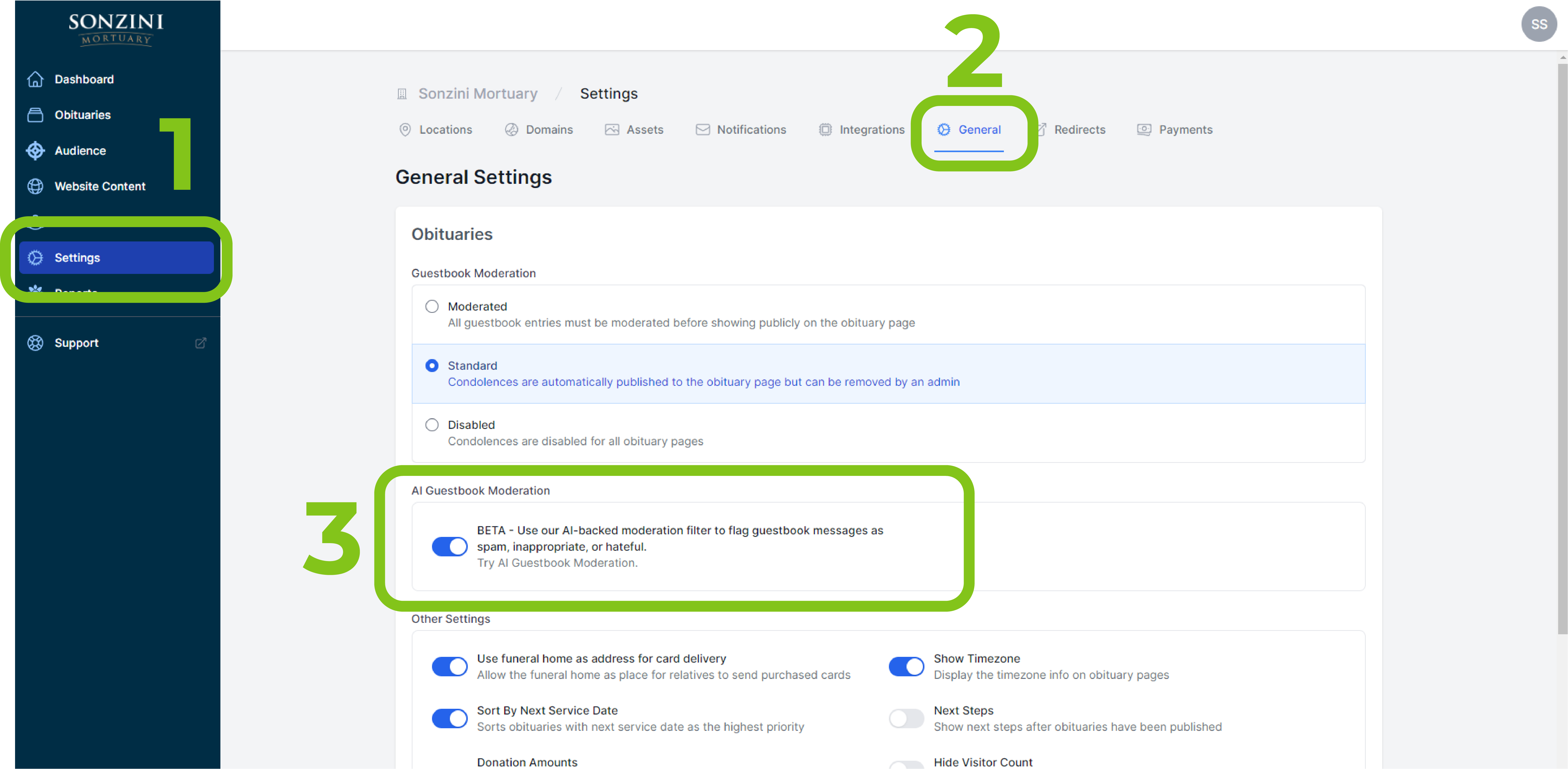
How to Enable AI Moderation
Ready to save time and let the harmless messages through automatically? Activating this feature only takes a few seconds:
- Log in to your Tukios Website account.
- Navigate to the "Settings" tab and click on the "General" button.
-
Locate the AI Guestbook Moderation Switch and toggle it to the "On" position.
We hope this tool helps you streamline your workflow and maintain a beautiful, respectful space for friends and family to share their memories.
If you have any questions about this feature or need help setting it up, reach out to your Tukios account manager or contact our support team at tukios.com or by phone at (801) 682-4391.